Showing posts with label Warcraft 3 Downloads. Show all posts

Warcraft Patch 1.22 Released by Blizzard

Warcraft Patch 1.22 Released by Blizzard today. Just connect to one of the four servers and patch up. But a lot people complaining about some problem that will occurs.

I. If the patch 1.22 download won't start for you, try getting it using the other three servers.

II. If "war3.exe cannot be found", download the missing update (Microsoft Visual C++ 2005 SP1 Redistributable Package (x86)) from here.

And here is the changelogs, correct me if i'm wrong:


Q u o t e:
--------------------------------------------------------------------------
WARCRAFT III: THE FROZEN THRONE VERSION HISTORY
--------------------------------------------------------------------------

--------------------------------------------------------------------------
Patch 1.22
--------------------------------------------------------------------------

FEATURES

- There is now a replay auto-save feature in the options menu. Replays
are automatically saved to the "replay" folder.
- The game is now automatically saved in the event of a potential
disconnect. These saved games are placed in the "save" folder.
- Player color selection can now be limited by the number of players in
the game using an option in the "Advanced Options" screen during game
creation.
- Added an option to always show unit and building health bars.
- You can now enable and disable the display of minimap signals
from players and other observers using chat commands:
/showminimapsignals and /hideminimapsignals.
- Added a new in-game cheat "maxfps" to limit the maximum frame rate to
the given number. Example: "maxfps 30" will set the maximum frame rate
to 30 FPS.

BALANCE CHANGES

HUMAN
- Scout Tower repair rate changed from 12 to 20.
- Knight damage increased: Attack cooldown changed from 1.50 to
1.40 and base damage increased from 25 to 28 (Average damage is 34).

UNDEAD
- Increased Ziggurat base armor from 1 to 5.
- Reduced the build time of the Necropolis from 120 to 100.

NIGHT ELF
- Reduce the Orb of venom poison duration from 10 seconds to 8 seconds.
- Increase the experience gain from Dryads from Level 2 (40xp) to
Level 3 (60 xp).

FIXES

- The cooldown on unlimited usable items (example: the staff of
preservation) now persists after the item is dropped or traded.
- A cooldown exploit with potions has been fixed.
- When you unburrow a Crypt Fiend, its auto-cast will no longer be toggled
off.
- An exploit bug in which items could lose their cooldowns when transferred
between heroes has been fixed.
- Fixed DotA-specific sound effects on Intel Macs.
- Fixed sound falloff on Intel Macs. Distant sounds should now still be
audible.

MAPS

- New maps from contest winners:
- (2)MeltingValley
- (2)RoadToStratholme
- (4)CentaurGrove
- (4)TidewaterGlades


The good news is, with Warcraft patch 1.22 the Mac user will now be able to hear "FIRST BLOOD" and the other anouncer sound when playing Dota-Allstars. We also have in game option to always see the health bar, nice! But there's also some issues that will occur when we are playing Dota-Allstars with Patch 1.22. The most reknown is the problem with the rune and lag. I hope this won't stop IceFrog to release Dota-Allstars 6.53 next week.

I'm still don't know how to upgrade to 1.22 without connect to server (offline), i know a lot of you want to do it. If some of you know how to do it, i will be happy if you share it in here :)

Edit: Add more information

Read more.....

Lesco's Warcraft Toolkit - LWT

Lesco's Warcraft Toolkit LWT, is a pack of utilites which conatins:-
1.Hp (Hitpoints) Viewer.
2.Disables desktop switching keys like: WindowsKeys, Alt+tab etc.
3.Battle.net server status/ping tool.
4.Allows you to make registries entries.
5.And the most useful thing of this toolkit is INVENTORY HOTKEYS you can change your inventory hot keys to any key.
6. Hp (Hitpoints) Viewer Own and enemy
7.Easy to Use :)

Read more.....

DotA Theme Manager Version 3 Realeased! New Barren Theme added

DotA Theme Manager Version 3, with new Barrens Theme! Maybe you already familiar with the Beach Theme of Dota-Allstars using DotA Theme Manager Version 2. And now the new version is available with a new theme, Barrens Theme. I will give you some mirror to download the Dota Theme Manager 3. If this is your first time install this theme, you can see the previous version to see the installation manual.

Read more.....

Make Gondar and Treant Model clickable easier

If you are tired of being unable to click on gondar/treant here is the solution.
It involves replacing gondar's and treant's models with others that look exactly the same but contain a few additional polygons to make clicking easier.

Old GondarNew Gondar

How to make it possible?

1.Download these files

2. Make sure local files are allowed by the registry:

Press Start->Run, type "regedit", press Ok. Browse to HKEY_CURRENT_USER/Software/Blizzard Entertainment/Warcraft III. If a key named "Allow Local Files" already exists, make sure its set to "0x00000001 (1)". If its not, double click it, type 1 and press enter. If it doesnt exist, right click in the right area, press New->DWORD Value, type the name "Allow Local Files" and change its value to 1 like I just said.

-or-
Just doubleclick the localfiles.reg file included in the attachment.

3. Download the attached .zip file and extract it in your WC3 directory (the files will appear at, for example, C:/Program Files/Games/Warcraft III/Buildings/NightElf/AncientProtector/AncientProtector.mdx and a similar path for gondar).

4. Enjoy! You can try running wc3 without these files and then with them and see the difference. If you're not sure whether it works or not, try swapping the 2 models and see if gondar now looks like treant and vice versa tongue.gif

Read more.....

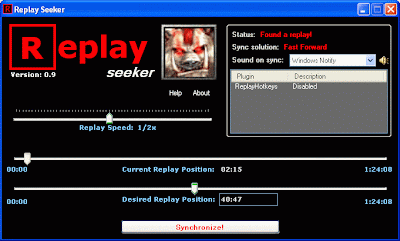
Replay Seeker v0.9 and Plugins Downloads

This tool should help you to manipulate the replay playback.

Authors: Danat & DonTomaso
What's new:
  • Fixed some bugs related to detecting the replay
  • Now you don't need to press Enter to confirm the desired time entered in the textbox.
  • Added support for plugins.
Features:
  • You can change the speed of the replay from 1/32x to 31x or make it run "as fast as possible".
  • You can specify the position in the replay that you want to reach, and ReplaySeeker will quickly fast-forward replay to that position, pausing the replay when done and playing a sound (to notify you). Note that this works while Warcraft is minimized, which allows you to do something else during the process (like browsing the forums).
  • Rewinding is supported but by restarting the replay and then fast-forwarding to the specified position, so it's not an actual rewind. You can always check whether the replay will be restarted or not by looking at the "sync solution" field.
What's new:
  • Fixed some bugs related to detecting the replay
  • Now you don't need to press Enter to confirm the desired time entered in the textbox.
  • Added support for plugins.
Requirements:
Since this program is written in C#, you need to have .NET Framework 2.0 installed on your computer (see link below).
.Net Framework 2.0 download page (dotnetfx.exe - 22,4 mb)
Some programs install FW2.0 automatically in order for them to work, so you might already have it installed on your pc.

For Vista Users:
To run this tool in Vista without any errors you must right click the exe and from the dropdown menu select "Run as administrator".


Plugins:

Simple Camera
(by DonTomaso).
A plugin that allows you to control the camera in Warcraft 3 without restrictions.

RSExtensions (by DonTomaso).
A plugin that prevents the replay of pausing when you unfocus the window (alt+tab), when not fast-forwarding.

NOTE: To use this plugins you need to copy the .dll file to the Plugins folder of the ReplaySeeker. For e.g. C:\Warcraft 3\Replay Seeker v0.9\Plugins

Read more.....

DotA Theme Manager

DotA Theme Manager allows you using different terrainsets in DotA without using a different map. This works by replacing the textures/models in your MPQs - WC3's Data files - itself. It will not only change DotA's Terrain (where it has no glitches), but also other maps. In other maps, it will look quite bad, so this is more useful for DotA. While it strongly changes the appearance of the map, it does not change anything of the gameplay - the changes are of PURE visual nature and the process is easily reversible. Also, the changes are only local.

Themes Preview
(Beachpack, snowpack, hellpack)


Installation :-
How to install the Theme Manager?
1. If you have beachpack installed, restore to original (if you can't, it won't be too bad afaik). You would have exchanged your War3Patch.mpq in this case and should have a backup (with lower filesize).
2. Unpack the file IN your warcraft folder - in most cases C:\Program Files\Warcraft III.
3. DO NOT move or rename any of the files you unpacked. The path must be: "\Warcraft III\DotA Theme Manager V2\"
4. If you want it on your desktop, create a shortcut of the exe file.
5. make sure both your WC3 and your World Editor are closed!
6. Go! (after checking step 2 and 3 again)

Usage:-
1. Close your warcraft AND warcraft world editor. Else it does not work!
2. Start the program. If you start it the first time, it will create a backup of your MPQ
3. Select your favourite toolkit. If you select one, it will always be activated unless you change it!
4. Start WC3. Whether you start it out of the program or not is not important.
Other maps might have a (visually) screwed terrain - I suggest you to use "original" when playing something different than DotA
.


For Detailed Installation, usage and FAQs visit this link.

Download Dota Theme Manager
v2.0
Download Dota Theme Manager v2.0 (Mirror)

Read more.....

Downloads: Warcraft III/Windows Mouse Capture

•WMC is an extended version of Warcraft III Mouse Capture.
•It allows you to lock the mouse within a specified window (not just limited to Warcraft III).
•The primary use of this program is to have a game (in window mode) on one monitor and applications such as IM and internet browser on another.
•Without WMC if you move your mouse to the edge of the screen while playing your game, your mouse will just leave the game. You wont be able to aim!

Read more.....

Warcraft v1.22 Patch Installer (No Registry Needed)

Warcraft v1.22 Patch Installer By Garena

By using this Warcraft v1.22a patch installer, you don't need to make registry in registry editor of windows.
Download WCIII1.22Patch.exe
Download WCIII1.22Patch.exe (Mirror)

Read more.....

Cheatpack Detector (CPD), Tool to Detect Fake/Hacked maps

Map folder got multiple same map, don't know which one is fake?
Play minigame like Fight of Character, TreeTag, TD, but don't know there's cheat in game?
Use CPD to keep away from fake/hacked map!

Download > Extract > Click "CheapackDetector.exe" > Browse map that you want to check > Click "Detect!"

Screenshoot:


Download:

Download Cheatpack Dectector (CPD)
Download Cheatpack Dectotor (mirror)

Read more.....

Warcraft 3 Banlist 3.0 (WC3Banlist 3.0)

This program is created to make an effort at keeping your Warcraft III custom games (for example DotA) free of notorious leavers. Thereby it offers a local database (to which you can add people yourself) to alert you when a "leaver" joins your game or someone you've kept some information about.


The program can do this in various ways:

* Play a sound as soon as a leaver is detected, or banned
* Display a text in-game floating at the top of your screen
* Copy a text into the clipboard, so you can view the comment by pressing CTRL-V


Further features include:

* Synchronization with other people's banlists via the Banlist.nl Buddy Banlist System
* Integration of clans' banlists / safelists
* Showing the country of or ping to joined players or the host
* A real-time chat interface for Warcraft III using built-in stylesheets to match the Warcraft III-look or another look to your liking
* An anti-download option which enables you to have people who try to download the map (when hosting) auto-kicked
* Automatic slot-reservation for your friends and clanmates
* Automatically copying the game name if your friend joins a game

System Requirements

* Microsoft Windows 2000, XP, Server 2003 or Vista
* Warcraft III - Reign of Chaos (with or without Frozen Throne) by Blizzard Entertainment
* A network device compatible with WinPcap (Most USB devices will not work)

Changes from 2.82:

* extensive redesign of the interface:
o new snooping tab showing all facts about the game and their players
o slot reservations can be done without using commands
o completely revamped local database tab
o bans and infos have been supplemented with fields for date and time of the last change
o a new score database and rating interface (for private use only so far)
o a new game database, including management of screenshots and replays
o nice icons

* a first-run wizard (made by heftig) helps newbies to set up the elemental settings
* new commands for rating and capturing screenshots
* a NIC detector which helps to find the right network card for WinPCap
* $param variable for phrases and custom comments, allowing to place the additional text given behind the keyword when using a command
* friend list support (used for anti-download exceptions and reservations)

Screenshot


Remember that WC3Banlist won't work without WinPcap 3.1 or later!

The 32 bit version of WinPcap is included in the WC3Banlist installer. For x64 systems, you will have to download the latest 64 bit driver. This download will take you to the WinPcap download page.

- Download: WinPcap

- Download: WC3Banlist 3.0 (Direct)


Read more.....

Battle.net Gateway Editor

Allows you add, remove, edit & detect gateways of Warcraft 3, Diablo and Starcraft

Screenshot (click to enlarge)


Download

Download2

Read more.....

How to connect eurobattle.net?

Guide to connect Eurobattle.net

Download w3battle_122a.exe (via easyshare)
Download w3battle_122a.exe (via rapidshare)

Read more.....

Dw3gparser - Tools For Parsing DotA Replay

An opensource parser written in Delphi for w3g files. W3g being the replay format used by the "Warcraft III" game. Mainly intented for the parsing of Warcraft III expansion custom maps replay.

Screenshot (click to enlarge)


Download
Download2

Read more.....

Warcraft 3 Battle.net Delay Reduer

Allows you to reduce delay from Battle.net games.
(more description in readme file in rar archive)

Screenshot (click to enlarge)


Download
Download2


Read more.....

Warcraft 3 Background Changer

This is a wc3 background changer. It allows you to easily change your Warcraft 3 background to something much nicer in only a few steps. You can change your WC3-Background to Undead, Human, Orc and Nightelf.

Instructions

• Note: Make sure that your Warcraft3 is closed
1. Open the "bgchanger.rar" file and extract it to your WARCRAFT 3 FOLDER.
2. Open your warcraft 3 folder and click the folder "bg changer".

3. Run Rutheme.exe by clicking it. If you get an error check: Here
4. Choose your background and open warcraft 3 to test it.

Screenshot (click to enlarge)


Download
Download2

Read more.....

Warcraft 3 Custom Kick Utility

Had Enough of flamers, feeders, noobs and AFK'ers!! It's time to kick them out of your Dota Game!
Download this utility by ShadowFrench called "Custom Kick"

Note: It only works in Lan and battle.net games. I am not responsible if any thing happens to you and your battle.net account =p

DOWNLOAD
DOWNLOAD2

Read more.....

Warcraft3 TFT+ROC v1.22 Download

http://i236.photobucket.com/albums/ff272/Rhine__/warcraft3_101131.jpghttp://i222.photobucket.com/albums/dd68/mrtunghp/box.jpg
Download : Warcraft III Reign of Chaos, The Frozen Throne + Update Patch War3TFT 122a English +CD Key (Torrent)

Note: You Need µTorrent to download files from this torrent.

Read more.....

Warcraft3 Autorefresh Tool / Utility

Allows you to refresh custom games when you are hosting & force the users to see your game at the top of the list.

Screenshot (click to enlarge)


Download
Download2

Read more.....

Warcraft Roc+TFT Cd Key changer

Allows you to change your Warcraft3 RoC+TFT cd key without installing a new copy of warcraft.

Screenshots (click to enlarge)


Download Warcraft 3 Reign Of Chaos CD Key Changer
Download Warcraft 3 The Frozen Throne CD key Changer

Read more.....

Warcraft3 1.22 Cd-Key Grabber

Allows you to Grab your cd-keys of your current Warcraft3 installed copy.

Screenshot (click to enlarge)


Read more.....